Mehbara is the learning platform for private language academies: tasks, marking, attendance, parents and the books in one place, under your academy's name.
Last summer I gowent to Alexandria with my family. We stayed one week and the sea was very beautiful. Every morning we waswere swimming and after that we eatate fish near the beach. My little brother wasafraid fromof the waves, so he sitsat on the sand all the day. I want to go again because I am enjoyenjoyed it tooso much.
Lovely details, and your story is clear. Now check your past tenses: went, ate, sat.
7/10
AI suggestionTeacher's markThe student sees nothing until the teacher releases it.Released by the teacher. The student can see it now.
An example answer, for illustration. In Mehbara, AI suggests the mark and the feedback; the pen stays in the teacher's hand.
Sound familiar?
Homework sent out in five WhatsApp groups.
Marks in a notebook only one teacher can read.
Fees in a spreadsheet nobody quite trusts.
A parent asking, for the third time, "how is she doing?"
All of it in one place, under your academy's name.
A week at your academy.
Follow one week, from a new student's first test to the month's books. Every screen here is the real product.
Saturday, morning
It starts before they enrol.
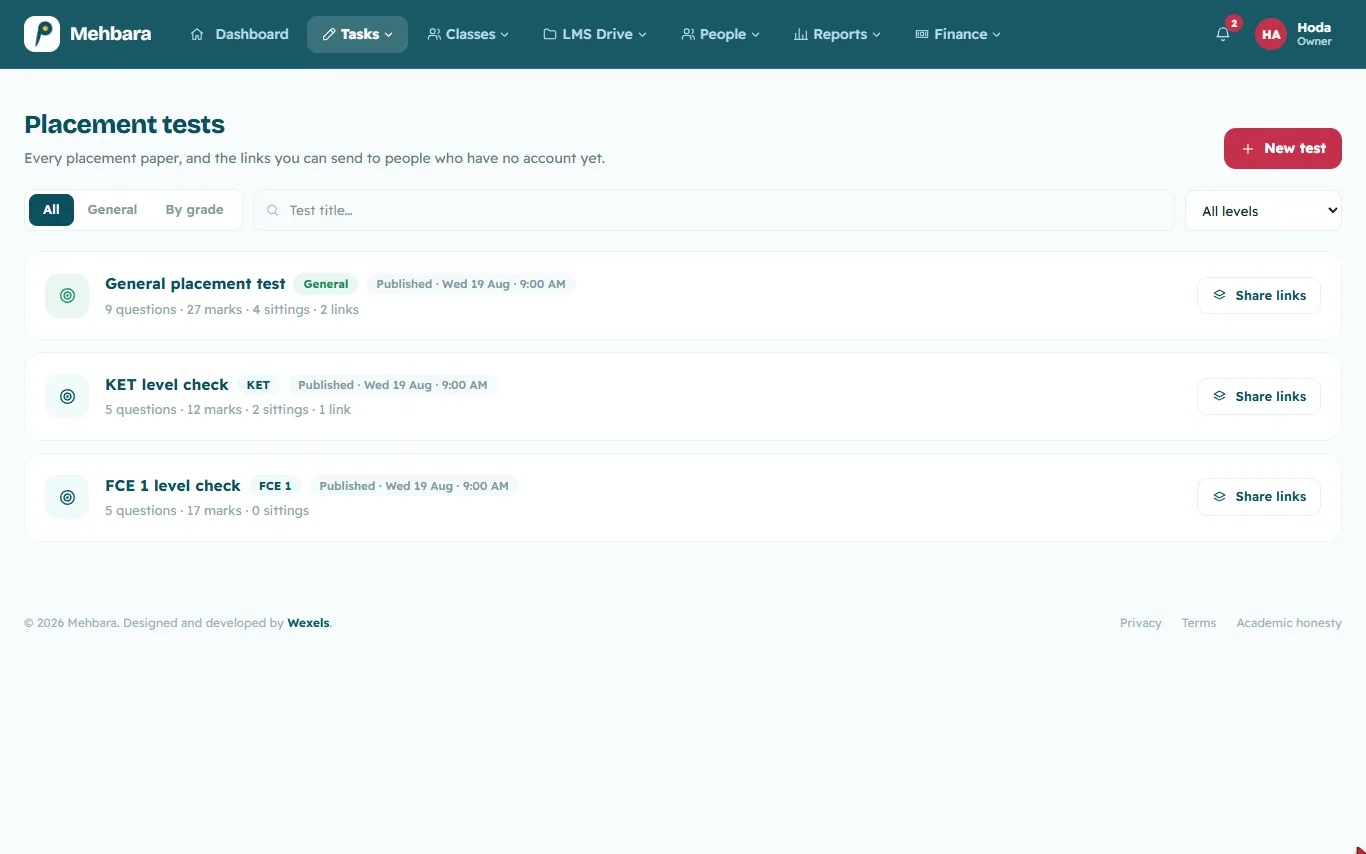
Send a placement test by private link to anyone who asks about your courses. They sit it on their phone without an account, and their answers land in the marking queue like any other paper. You know where they belong before they pay.
Placement tests
Saturday, evening
The question bank
Prepared once, for every class.
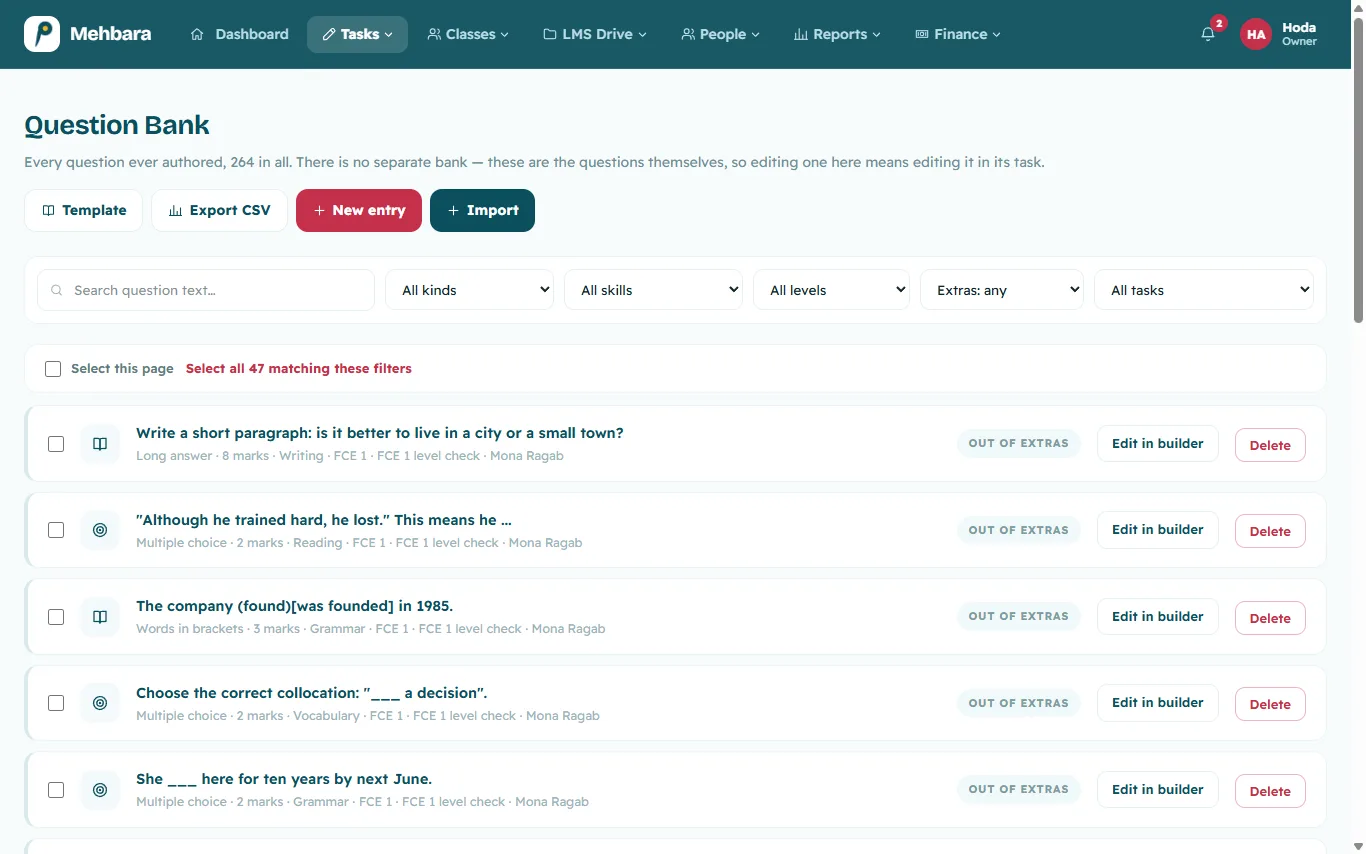
Homework, exit tickets and exams in parts, across listening, reading, writing, grammar and vocabulary. Any picture can become an interactive worksheet.
Every question any teacher writes waits in the bank for the next class, so nothing is written twice.
Sunday, after school
One task, two rooms.
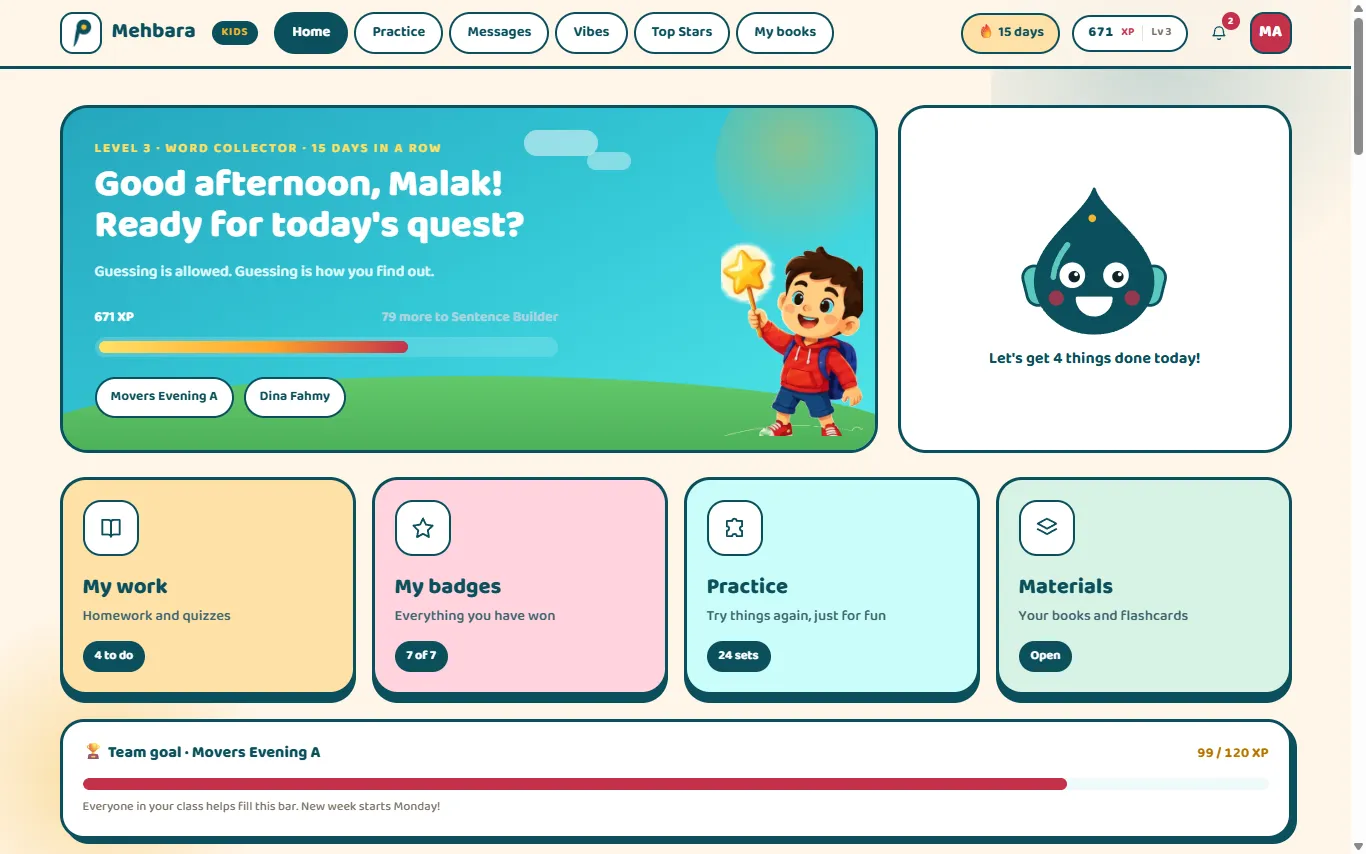
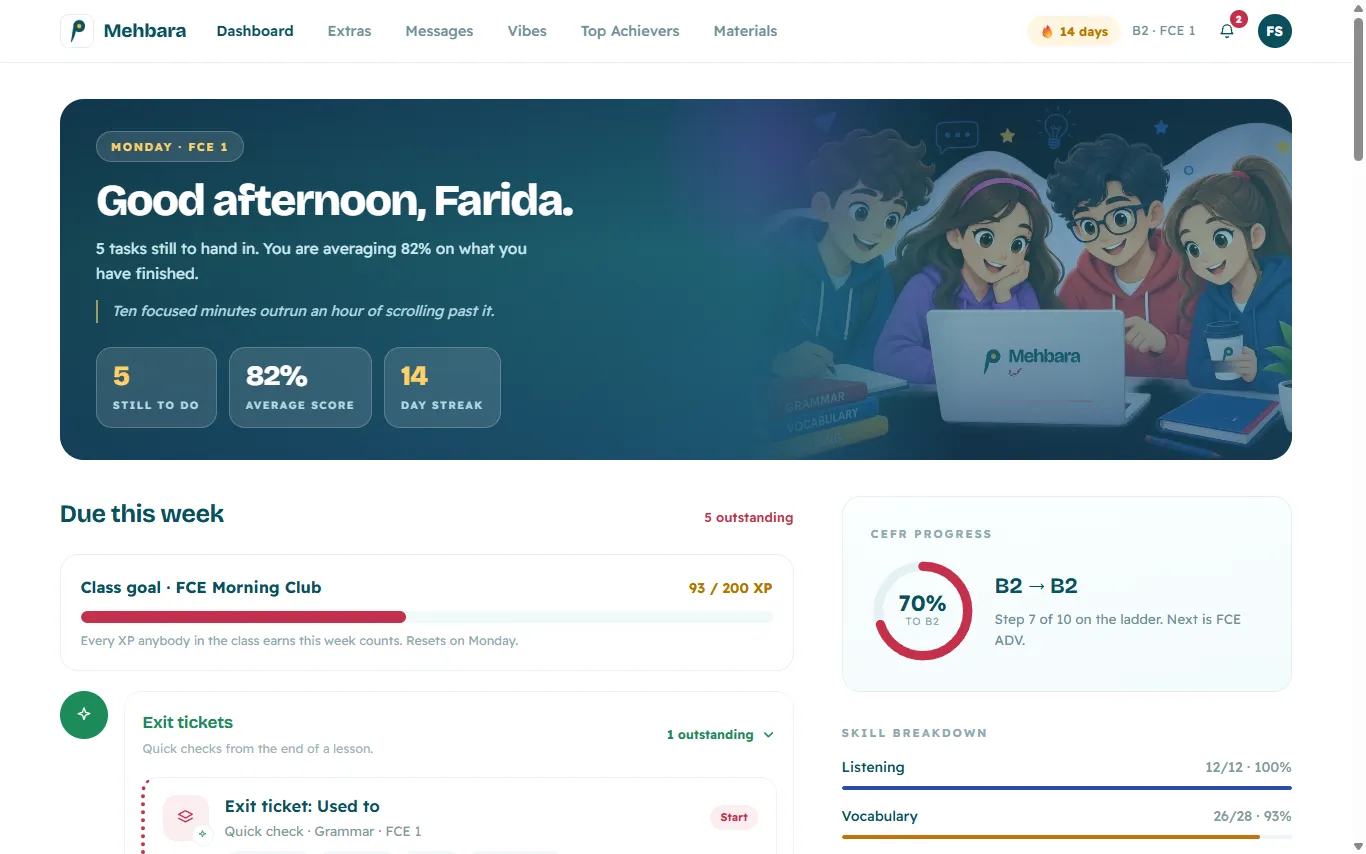
Kids and teens work on the same tasks. What changes is the room each of them walks into.
Kids. XP, streaks, badges, and Noqta, a small drop of ink who keeps them company.
Teens. What is due, where they stand, and what the teacher last said. Clean and focused, no cartoons.
Between tasks, Extras lets them practise any skill with nothing recorded and nothing at stake.
Monday, 7 pm
A speaking partner that sticks to the lesson.
The teacher writes the topic, the questions and the words they want to hear. The student holds the big button and talks, and the AI speaking tutor asks the teacher's questions one at a time, without wandering off the topic.
Afterwards the teacher reads the whole conversation, listens back if they like, and gives the mark themselves.
A real conversation with the tutor
Tuesday, 9 pm
Marking
Only the writing is waiting.
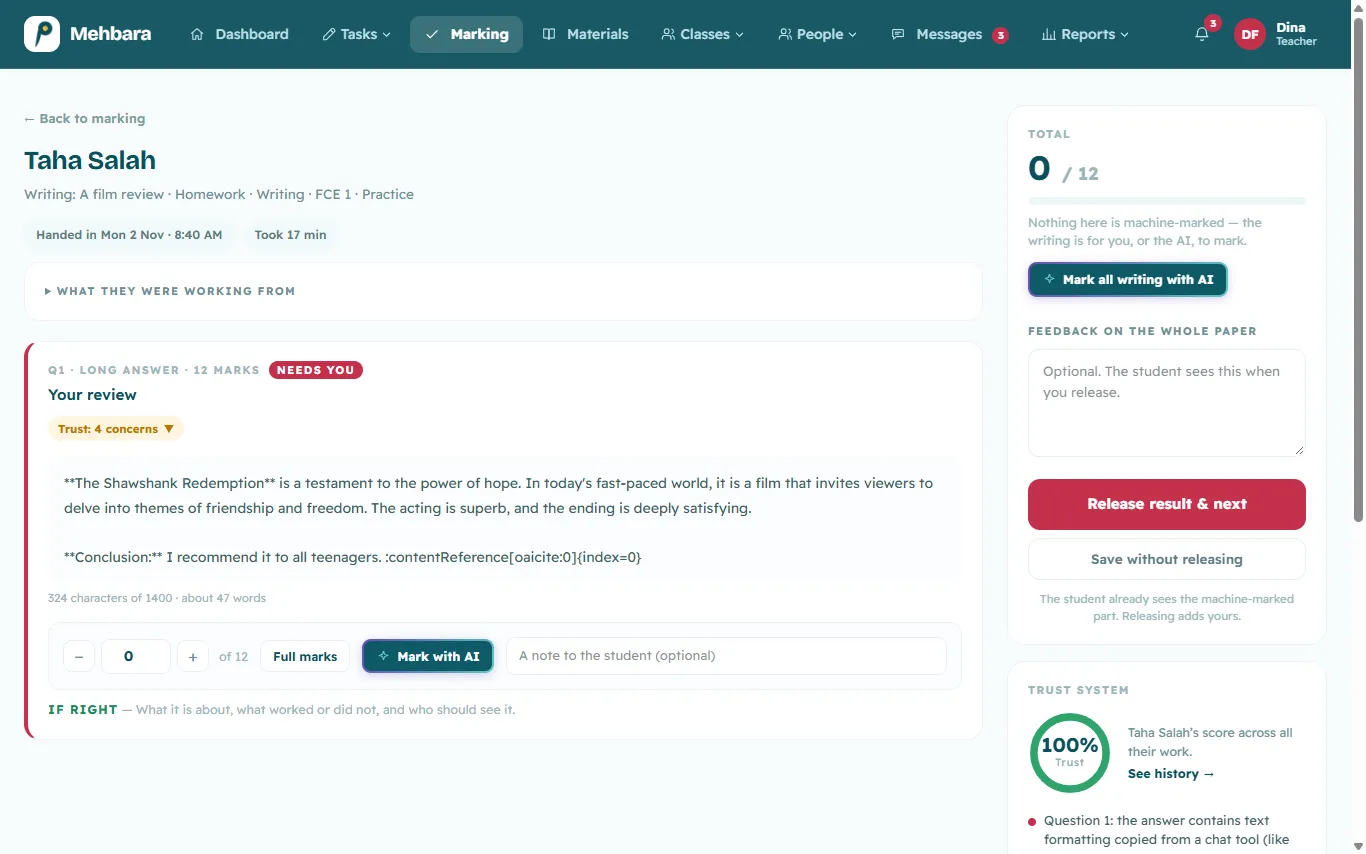
By the time a teacher opens the marking queue, multiple choice, re-order and gap-fill answers are already marked. Each written answer arrives with a mark and feedback suggested by AI. The teacher changes whatever they disagree with, then releases the result.
Most of the marking is done before the teacher sits down, and the decision stays with them.
Friday
Effort they can spend.
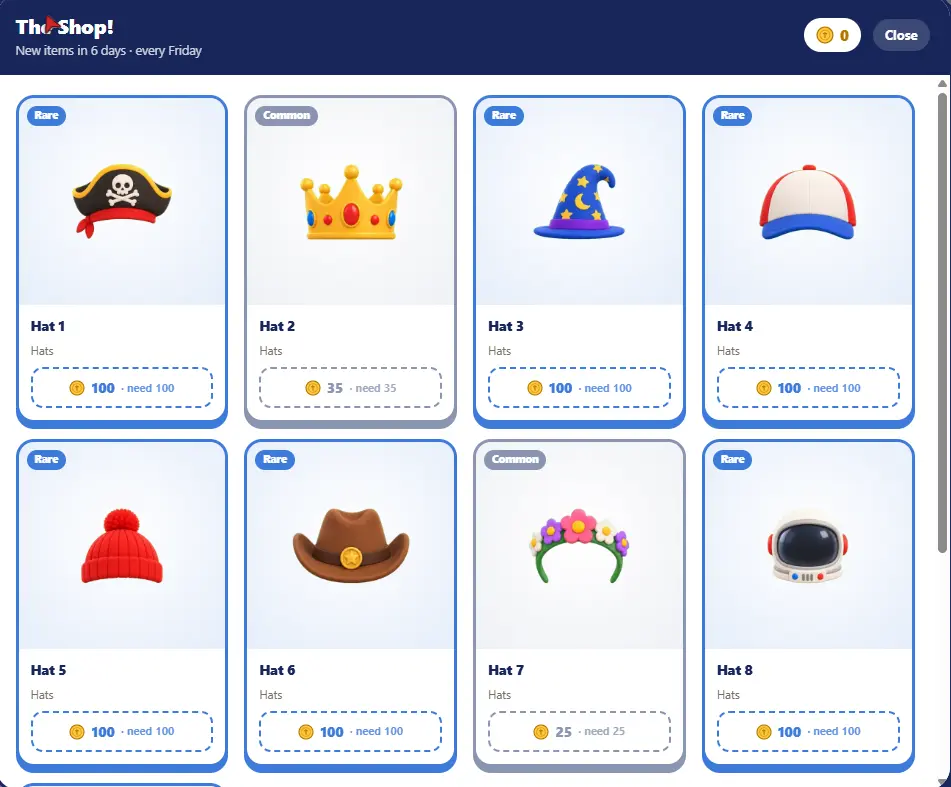
Every XP point earns a coin, turning up to class earns more, and teachers can give coins for taking part or helping a classmate.
Every Friday new pieces arrive in the shop. Kids dress up a character, teens collect pieces, and spending never lowers their XP. Students come back because there is something to work towards.
The Friday drop
End of the month
The month closes itself.
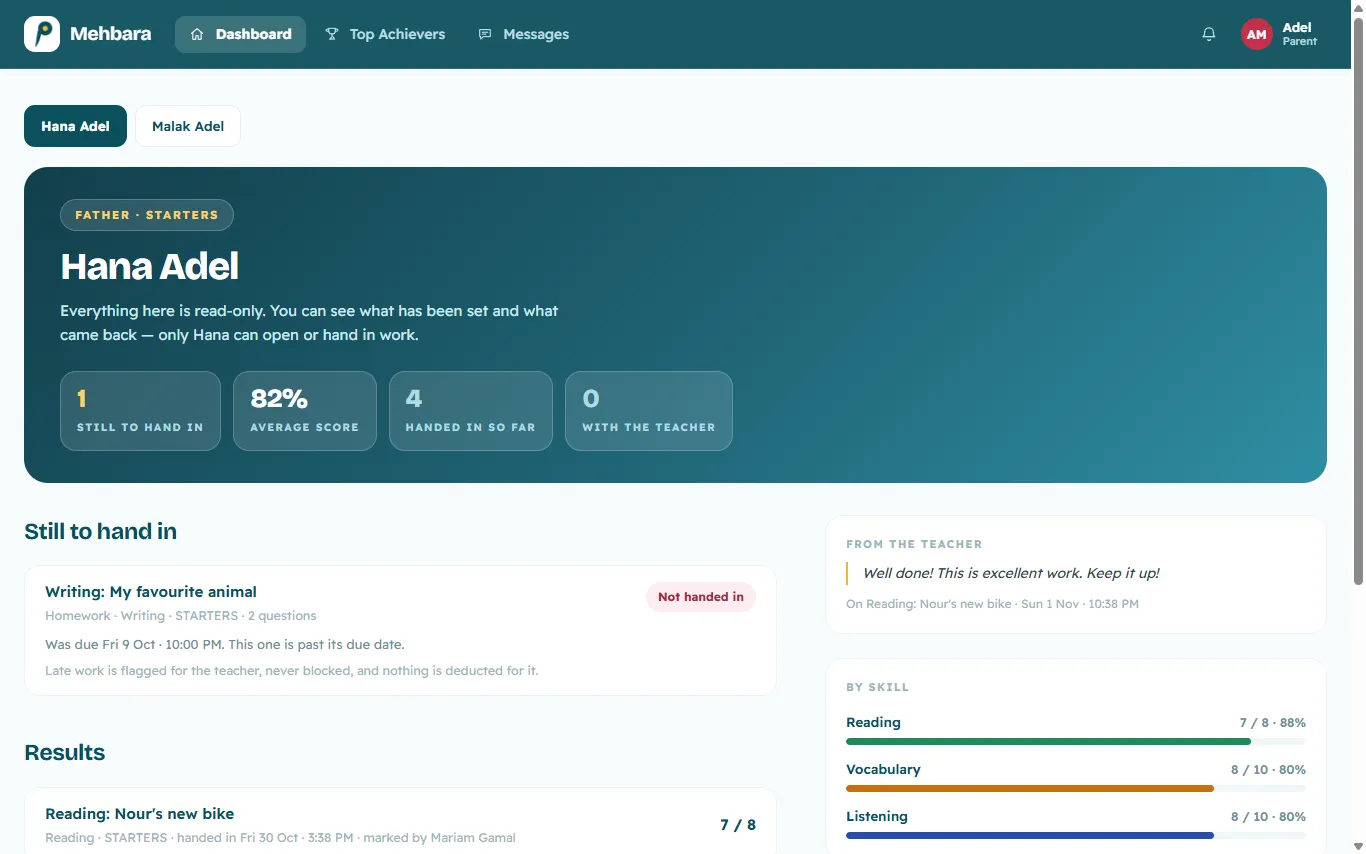
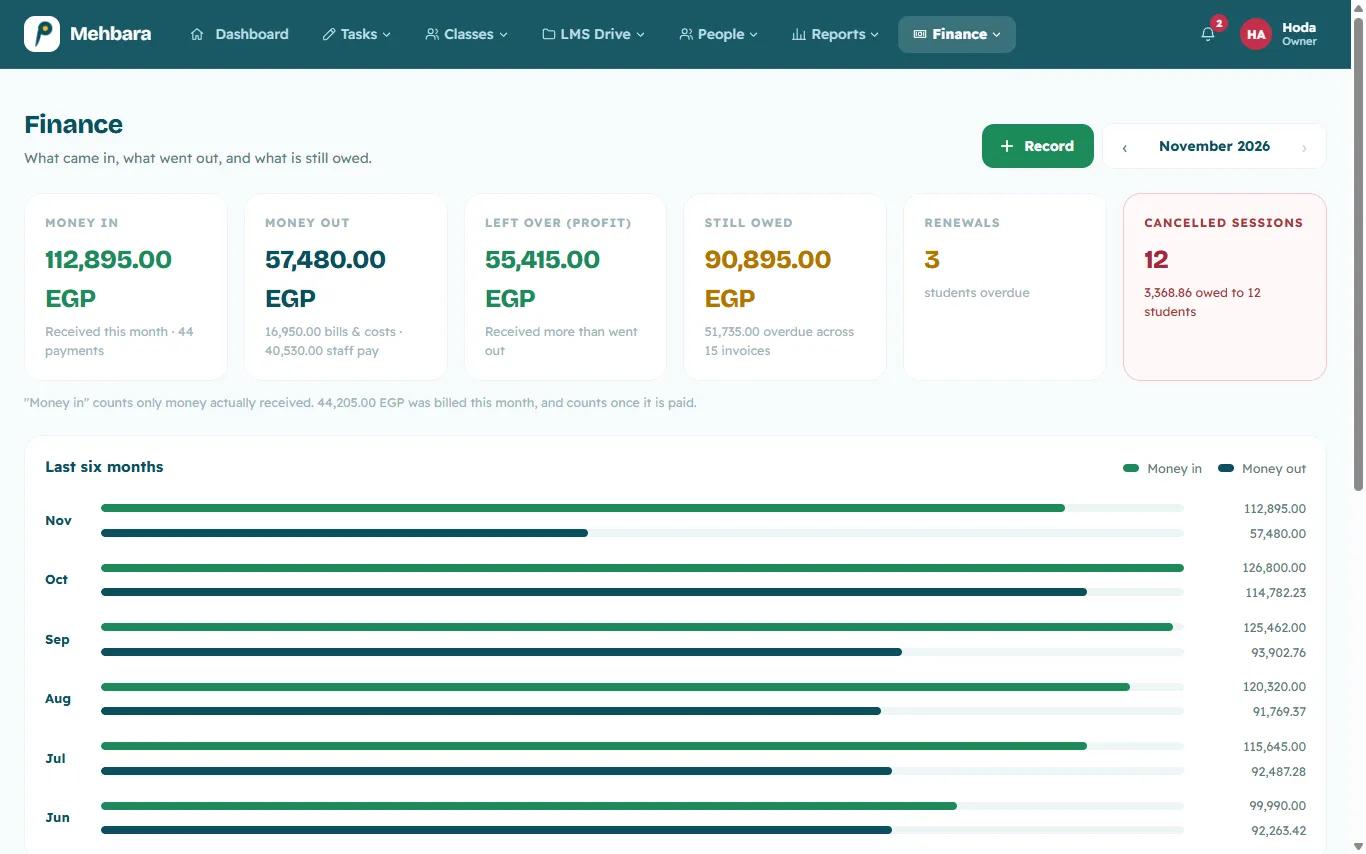
Report cards go to every family as PDFs in one go, and parents follow their child's work from their own read-only login. On your side, bills, part-payments, renewals and staff pay add up to a profit view you can read without an accountant beside you.
What a parent sees
What you see
Can I trust the AI?
AI that knows its place.
It does the slow first pass. The decision stays with a person.
What it does
Reads written answers and suggests a mark and feedback, against the criteria the teacher sets for the task.
Words that feedback for the student's age: everyday words for a nine-year-old, straight talk for a teen.
Takes a second look at gap answers that missed the key by a typo. It can only give a mark back, never take one away.
Talks with students by voice as a speaking tutor, on questions the teacher wrote. The teacher can listen back afterwards.
Supplied by Wexels AI.
What it never does
Release a mark on a student's assigned writing. That takes a teacher's press.
Go off script. The speaking tutor asks the teacher's questions as written and stays on the topic.
Share recordings beyond the staff. Students are told before they start, and neither students nor parents can open them.
Accuse anyone of cheating. The academic honesty record uses no AI, and only a teacher can act on what it notices.
One exception, stated plainly: in free practice, where no teacher is involved and nothing is recorded, the AI's mark is the score, and the screen says that no teacher saw it.
Is it really ours?
Yours, not ours.
Families should feel they are signing in to your academy, because they are.
Your name, colours and domain
Students and parents sign in at your address, under your logo, in your colours.
Your roles and permissions
Rename a role, add a new one and tick what each may do, without a developer.
Children's privacy
A child's photo cannot be published until a parent's written consent is on file, and that consent stays in a private file.
No tracking by default
No analytics script loads unless you add your own ID.
Your questions and your roll, in a file
Export the question bank and your user lists as CSV whenever you need them.
Will it fit the way we teach?
Shaped to the way you teach.
One platform, wide enough for children learning their first words and adults sitting an exam that changes their plans.
young learners
EFL from the very first word.
Playful screens with XP, badges and Noqta for company.
Any picture becomes an interactive worksheet.
Feedback in words a nine-year-old understands.
Parents follow everything from their own login.
teens & Cambridge
From KET to C1, step by step.
Calm screens showing what is due and where they stand on the CEFR ladder.
Monthly exams in parts, on a timer, like the real thing.
Progress shown skill by skill.
IELTS
All four skills, judged by your criteria.
Listening, reading, writing and speaking in one task builder.
Timed exam parts to practise under the clock.
Writing arrives with a suggested mark and feedback against the criteria you set. The decision is yours.
Speaking practice on your questions, with a recording to listen back to.
ESL & adults
For people who need English for daily life.
The same calm screens, no cartoons.
Voice answers and file uploads, not just multiple choice.
A placement test by private link before they enrol.
Direct messages between teacher and student.
From the first call to the first class.
You are not left alone with a new system. We set it up with you, then we stay.
1
A walk-through
You tell us how your academy runs, and we show you Mehbara around it.
2
Under your name
We set up your domain, logo, colours, levels and roles.
3
Your records move in
We bring your students, staff and questions over from your spreadsheets.
4
Your team is shown around
A session for your staff on the screens they will actually use.
5
The first class
You open the doors. We stay on.
after launch
Wexels Care
Ongoing support from Wexels: your questions answered, anything broken fixed, and Mehbara kept running as it should.
First year free
Questions before you start.
Anything else, ask us on WhatsApp.
How much does it cost?
From 2,000 EGP a month, plus your domain's yearly fee, with the first year of Wexels Care included. We confirm the final price after the walk-through, based on your academy's size and what you need.
Is our data ours?
Yes. Your academy runs on its own install with its own database, shared with no other academy. You can export the question bank and your user lists as CSV whenever you like.
Does it work in Arabic?
The platform is in English today. An Arabic interface is on the way.
Do students need to install anything?
No. Mehbara runs in the browser on a phone, tablet or computer. Speaking practice only needs a microphone.
What about children's privacy?
A child's photo cannot be published until a parent's written consent is on file, and the consent stays private. Speaking recordings open for staff only, and no tracking script loads unless you add your own ID.
Tell us how your academy runs, and we'll show you Mehbara around it.
 Mehbara